
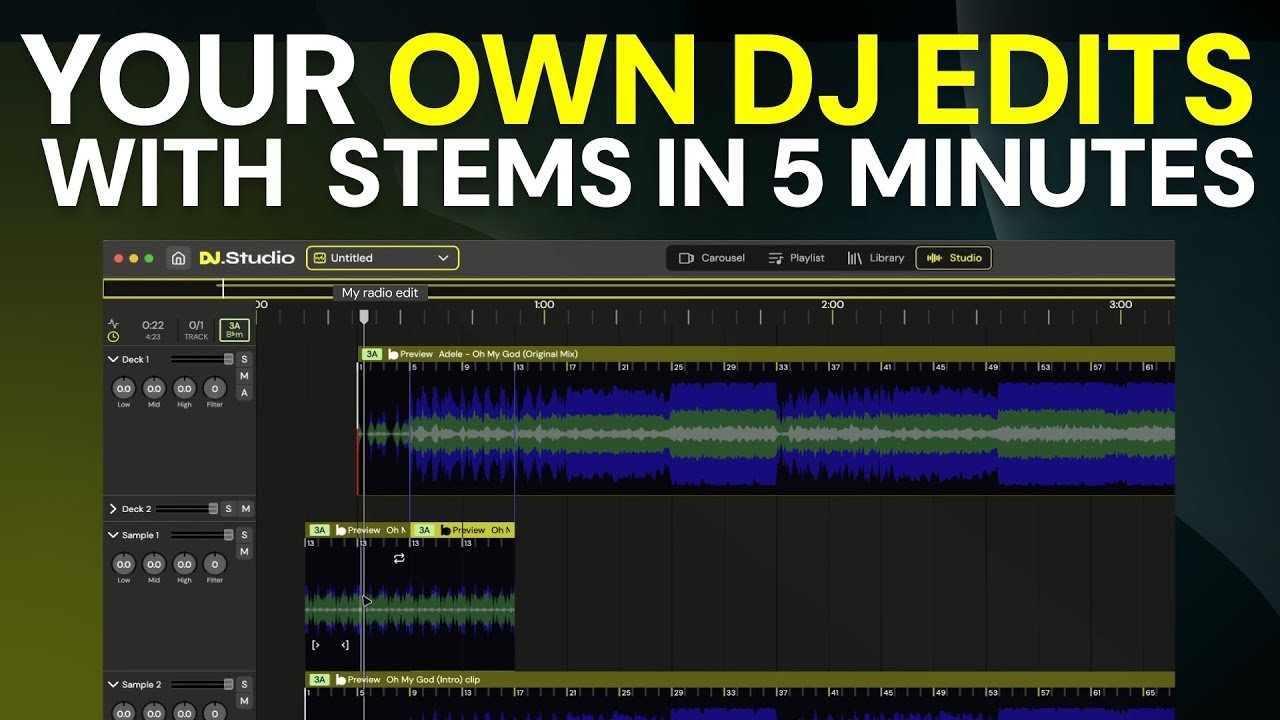
DJ edits happen on demand. A club residency adds a new track to the playlist at the last minute. A festival requires a custom intro version that fades in differently than the release. A private event brief asks for a version without specific lyrical content. The edit needs to exist before the next gig, and the next gig is often soon.
The traditional workflow for making a custom DJ edit requires opening a full DAW session, setting up the project, importing the track, and then doing whatever creative work the edit requires. For a simple edit — an extended intro, a clean ending, a specific section removed — this overhead can represent more time than the creative work itself.
A stem splitter available as a fast web-based tool changes the workflow economics.
Where the Time Goes in a Traditional DJ Edit Session?
The right place depends on your specific context. The full DAW session workflow isn’t slow because the editing is complex. It’s slow because of everything surrounding the editing. Opening the application, creating a project, importing the file, setting up the monitoring, establishing the routing — this overhead exists regardless of how simple the edit is.
For a DJ making twenty edits across an evening’s set preparation, that overhead multiplies. The actual creative decision on each edit might take three minutes. The surrounding workflow might take ten.
The gap between “I need an edit” and “I have the edit” is longer than it needs to be when the bottleneck is tooling overhead rather than creative judgment.
The edit takes minutes. Opening the DAW for the edit takes longer.
What Fast Stem Access Enables for DJ Workflow?
Immediate Availability of Edit Components
The primary creative resource for most DJ edits is the separated stem — typically either an a cappella or a drumless version. An ai stem splitter that processes a track and returns separated stems within seconds changes the available workflow. Stems are ready before a full DAW session would be set up.
Specific Edit Types That Become Faster
Extended intros: A track whose intro is shorter than your mix needs can be extended using just the drum stem or the ambient stem from the opening section — elements that are more useful for extending intros than the full mix. Accessing these without a full session makes the edit faster.
Clean endings: Ending a track cleanly without a fade requires knowing what elements to remove and when. Separated stems let you build an ending that uses the vocal-only or percussion-only content from the final bars.
Section-specific removals: An edit that removes a specific verse or chorus requires placing the remaining sections in sequence. With stems rather than just the full mix, the removal can be done while preserving specific elements that bridge the gap.
Working From a Browser Rather Than a Software Install
Web-based stem tools operate in any environment where there’s a browser. This matters for DJs who work across multiple machines, who work in venues where their DAW isn’t installed, or who want to make edits at a client meeting without a full studio setup.
How to Build a Faster Edit Workflow?
Integrate stem separation as the first step in any edit workflow. Before deciding what the edit needs, separate the stems. Having them available creates options that inform the edit decision. The three-minute session of listening to separated components often produces a better edit concept than jumping immediately to cutting the full mix.
Build an organized archive of pre-separated stems for frequently used tracks. For tracks that appear regularly in your sets, separate the stems once and keep them organized and labeled. The next time an edit is needed, the stems are already available.
Use separated stems for DJ mixing previews, not just edits. Stem splitter technology is useful beyond edit production — playing a stem through headphones while previewing a mix in the monitors lets you evaluate how the vocal element of an incoming track will sit over the outgoing track’s instrumentation before committing to the mix.
Establish a consistent naming and organization system for exported stems. Stems from multiple tracks can accumulate quickly. Consistent naming — track name, BPM, key, stem type — makes the archive searchable when you’re looking for specific components during set preparation.
Frequently Asked Questions
Why does the traditional DAW workflow create unnecessary overhead for DJ edits?
The full DAW session workflow is slow not because the editing is complex but because of everything surrounding it — opening the application, creating a project, importing the file, setting up monitoring, establishing routing. This overhead exists regardless of how simple the edit is. For a DJ making twenty edits across set preparation, a three-minute creative decision may take thirteen minutes total. The bottleneck is tooling, not judgment.
What types of DJ edits does fast stem access make more practical?
Extended intros: a track whose intro is shorter than your mix needs can be extended using just the drum stem or the ambient stem from the opening section rather than the full mix. Clean endings: separating final bars allows building an ending using vocal-only or percussion-only content that avoids an obvious fade. Section-specific removals: with stems rather than just the full mix, removing a specific verse or chorus can be done while preserving specific elements that bridge the gap. All of these are faster when stems are ready before a full DAW session would be set up.
How should DJs organize their stem workflow for efficient set preparation?
Build an organized archive of pre-separated stems for frequently used tracks — separate them once and keep them labeled so the next time an edit is needed, stems are already available. Use a consistent naming system: track name, BPM, key, stem type. Integrate stem separation as the first step in any edit workflow rather than jumping immediately to cutting the full mix; three minutes of listening to separated components often produces a better edit concept. Use stems beyond edit production: playing a stem through headphones while previewing a mix in the monitors lets you evaluate how a vocal element will sit over the outgoing track’s instrumentation before committing.
The Workflow That Moves at the Speed of Creative Decisions
The edit workflow should move at the speed of the creative decision, not at the speed of software overhead. When the bottleneck is tooling, the edits that would have been good ideas become edits that didn’t get made because there wasn’t time.
Fast stem access removes tooling as the constraint. The quality of the edit is determined by the DJ’s judgment and experience. The speed of the edit is determined by how quickly the components are available. Getting those components quickly is a solved problem.